explain-diff-html
Explain Diff (HTML)
An agent skill that turns a code change into one self-contained HTML page that
teaches a reader what changed and why. It runs in Claude Code, Codex, Cursor,
and every other agent the skills installer reaches.
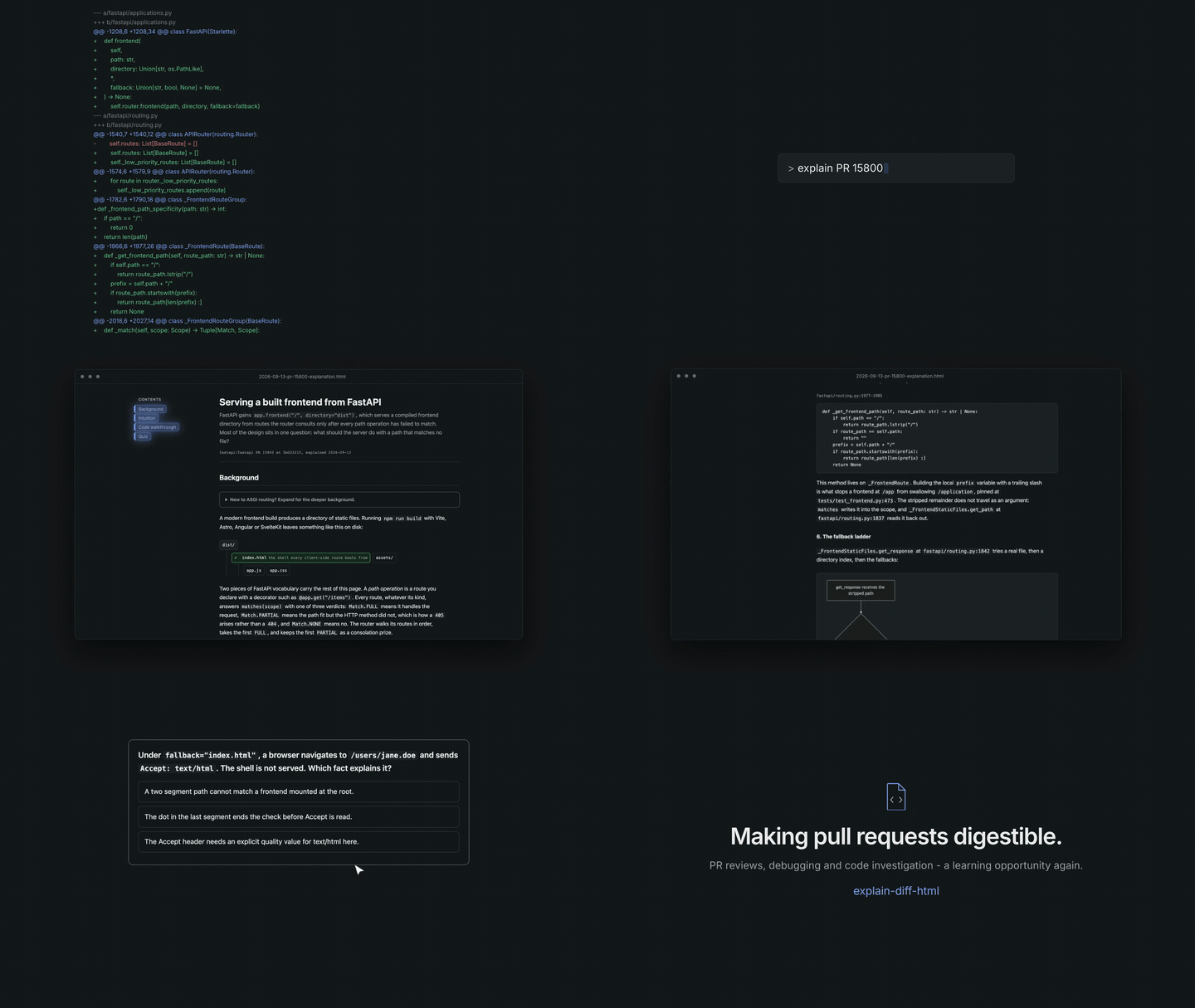
Demo generated by the brag skill.
Origin
This started from Geoffrey Litt’s explain-diff gist,
which set out the four-section structure, the quiz, the self-contained HTML
output, and the skill’s name. This version adds flow-ordered walkthroughs,
verified file:line anchors at the target ref, Mermaid diagrams with
validation, a provenance line, and a set of checks built from specific
failures.
This version also adapts work from Cat Hicks’ learning-opportunities skill: three of the quiz question shapes, and the rule that difficulty belongs in the stem rather than in near-identical options. That skill is CC-BY-4.0.
It was written as a Claude Code skill, and SKILL.md keeps that format. Other
agents read the same format now, so npx skills add installs it elsewhere
without changing the file.
Why this exists
Bigger PRs, and why Git's file order hides how they work.
AI is helping us write code faster than ever.
That’s great, but there’s also a side effect: we’re generating more code, reviewing bigger changes, and sometimes understanding less of what actually happened.
You open a PR and suddenly there are hundreds, maybe thousands, of changed lines across a bunch of files.
Git shows you the diff file by file.
controller.ts
service.ts
utils.ts
tests…
But that’s usually not how the change actually works.
So where do you start?
Which file matters first? What calls what? Why was the change needed? How does the data move through the system?
And that’s where PR reviews can start becoming difficult.
For me, PRs have always been one of the best ways to learn a codebase. You look at someone else’s changes, follow the flow, understand why they made certain decisions, and slowly build a better mental model of the system.
As AI generates more of the implementation and PRs keep getting larger, I didn’t want to lose that learning opportunity.
That’s where explain-diff-html came from.
Instead of explaining a change in the order Git happens to show the files, it tries to follow the logical flow of the code.
So instead of:
file A → file B → file C
it might explain it as:
request → handler → service → transformation → result
It looks at the diff, the surrounding code, callers, related definitions, commits, and documentation, then turns all of that into a walkthrough that tries to answer a simple question:
“If I actually want to understand this PR, where should I start and how does everything connect?”
And it’s not limited to PRs.
Hand it a bug investigation or an RCA alongside the diff, and it connects the reported failure to the fix.
Where it helps, below, covers that and the other uses.
The goal isn’t just to tell you what changed.
The goal is to help make PR reviews, debugging, and code investigation a learning opportunity again.
What it produces
Point it at a pull request, a branch, or a commit range. It reads the diff, then the code around it, and writes a single page with four sections:
- Background, on the system the change lands in, with the beginner-level part collapsed so a familiar reader can skip it.
- Intuition, on the core idea, with toy data and diagrams rather than full detail.
- Code walkthrough, ordered by the path a request or an action takes through the system, not by filename.
- Quiz, five interactive multiple-choice questions that test whether the reader understood why the change is shaped the way it is.
The output is one HTML file with the CSS and JavaScript inline. It opens with a double click, reads on a phone, and follows the reader’s light or dark system theme. Nothing needs a server, a build step, or a network round trip, apart from Mermaid.
Mermaid is the diagramming library these pages use for state, entity-relationship, sequence, and flow diagrams. A page carrying one of those loads Mermaid from a CDN, so it needs network for those diagrams to draw. Everything else on the page, including the hand-built diagrams and the quiz, works offline.
Where it helps
Onboarding, machine-written changes, and post-mortems.
The main use is reading a pull request before you review it. Three others come up often.
Onboarding. Point it at the old merged pull request that introduced something foundational rather than at documentation written a year ago. A new hire gets a walkthrough built from the code as it actually is.
Large or machine-written changes. Git orders a diff by path, so a change spanning controllers, services, and models arrives in an order nobody wrote it in. The page orders it by the path a request takes. That matters most on pull requests an agent produced, where the volume outruns what a reviewer can hold at once.
Bug fixes and post-mortems. Hand the skill your incident report or investigation notes alongside the diff. The page connects the reported failure to the fix, so the reader sees where the bug lived and why the patch closes it.
Samples
Nine samples across four languages, all from public repositories. Eight explain one merged pull request. The ninth explains a whole release, 94 commits across 417 files, to show what the skill does when the target is bigger than a single change.
The first column links to the rendered pages on GitHub Pages. Opening the same
files from the samples/ directory in this repository shows their HTML source
instead, because GitHub serves .html as code rather than rendering it.
| Page | Repository | Source | What it teaches |
|---|---|---|---|
| v30.1.0 | jsdom/jsdom, JavaScript | v30.1.0 | Why a release of small fixes moved 127 files, and the style guide that keeps the cause out of the release notes |
| PR 11305 | TanStack/query, TypeScript | 11305 | A ?.field guard answering two questions at once, so falsy errors never reached the error boundary |
| PR 11242 | TanStack/query, TypeScript | 11242 | A guard that reset only on the happy path, and why the fix uses finally with no catch |
| PR 16102 | fastapi/fastapi, Python | 16102 | A three-valued option collapsed at the public boundary, and the stack depth a warning depends on |
| PR 16013 | fastapi/fastapi, Python | 16013 | Double-checked locking and build-then-publish, and why the list is assigned before the version |
| PR 15800 | fastapi/fastapi, Python | 15800 | A second route list consulted only after every path operation missed, and how a miss tells a browser from an asset fetch |
| PR 2924 | uPortal, Java | 2924 | A catch that logs and falls through, and an @Ignore that had been skipping 30 tests |
| PR 2945 | uPortal, Java | 2945 | Picking the type that matches the intent, so a static-analysis suppression stops being needed |
| PR 2983 | uPortal, Java | 2983 | An implicit path attribute made explicit, moving resolution from the server to the browser |
Every page went through two checks. A read-only pass re-opens each cited
file:line at the target ref and tries to falsify the claim. A cold read then
tests the prose against the skill’s writing rules.
Requirements
git, gh, and node, plus what runs on which platform.
| Tool | Needed when | Used for |
|---|---|---|
git |
Every run | Resolving the base, fetching the ref, reading the diff |
gh |
Explaining a pull request | Fetching the pull request title, body, and URL |
node |
Every run, version 22.18 or later | Validating the page in step 7, and Mermaid sources in step 4 through npx |
gh must be authenticated, not only installed. Check with gh auth status.
Node is a build-time validator only. Nobody needs Node to open a finished page, because the reader’s browser loads Mermaid from the CDN.
The skill’s commands are POSIX shell, so it runs on Linux and macOS directly,
and on Windows through WSL or Git Bash. Windows PowerShell and cmd.exe are not
supported: they have no command -v, no $(...) substitution, and none of
mktemp, sed, or openssl. The generated page itself is plain HTML and opens
in any browser on any platform.
Install
One command, run from the project you want it in:
npx skills add malav2110/explain-diff-html
That installs it for that project alone. Add -g to install it once for every
project instead.
The installer is skills, which reads
skills/explain-diff-html/SKILL.md. It copies that directory and nothing else,
so the samples and images stay in this repository. It reaches 79 agents, among
them Claude Code, Codex, Cursor, Gemini CLI, GitHub Copilot, Windsurf, Zed,
opencode, and Goose. It installs to the agents it detects, or to ones you name:
npx skills add malav2110/explain-diff-html -a codex
Then npx skills list shows what is installed, npx skills update moves it to
a newer version, and npx skills remove takes it out again.
Installing by hand
The skill is the skills/explain-diff-html directory, so copying that one
directory into place works too. The validator in step 7 still needs Node.
For every project you work on:
git clone https://github.com/malav2110/explain-diff-html.git /tmp/edh
cp -R /tmp/edh/skills/explain-diff-html ~/.claude/skills/
For one project only, committed alongside the code so your team gets it too:
git clone https://github.com/malav2110/explain-diff-html.git /tmp/edh
cp -R /tmp/edh/skills/explain-diff-html <your-repo>/.claude/skills/
Those two paths are Claude Code’s. Other agents read skills from their own
directories. npx skills add finds the right one for you.
Copy the directory as a whole: it holds every file the skill uses.
Confirm the install with npx skills list, or by asking your agent to list its
skills. explain-diff-html should appear with its description.
Use
Ask in plain language. The skill triggers on phrasing like this:
explain PR 1234
explain this diff
walk me through this branch
explain the changes between abc123 and def456
It writes the page to a code-explanations folder in your home directory,
$HOME/code-explanations, named
YYYY-MM-DD-<KEY>-explanation.html, and reports the path. The date comes first
so the files sort by time, and the key comes second so you can grep for a ticket
or a pull request later. <KEY> is an issue key such as PROJ-1234 when the
branch name carries one, otherwise pr-1234, otherwise a short slug.
Output lands outside the repository on purpose. An explanation is not a project artifact, and writing it into the working tree invites committing it by accident.
Limitations
It explains a change. It does not critique one.
The page will not tell you whether the change is correct, whether the approach is right, or what to fix. There are no findings, no severity ratings, and no verdict anywhere in it. Read it to understand a pull request before you review it, or to learn a codebase from changes someone else made. The reviewing is still yours.
The page also describes the pull request in whatever form it has when you run the skill. It is a snapshot of one diff at one ref. If the author pushes three more commits afterwards, the page still describes what it read, and nothing in it updates. Generate a new page rather than trusting an old one.
It explains what the record supports. Where the reasoning behind a change is not in the diff, the commits, the pull request body, or the repository’s own documents, the page says so rather than inventing a motive.
How it works
The eight steps, and two checks that exist because of bugs.
SKILL.md drives the agent through eight steps. In outline:
- Resolve the target and the filename key, detecting the repository’s default
branch rather than assuming
main. - Gather context: the code around the diff, the pull request body, the commit messages, and any design records the repository keeps.
- Draft the four sections, walking the code in flow order.
- Build the diagrams, from three families of plain HTML and CSS, plus Mermaid for state, entity-relationship, and sequence.
- Write the quiz to the question shapes that test transfer rather than recall.
- Hand the prose to a fresh reader for an editing pass, because an author misses their own tells.
- Run the self-check, including re-reading every cited
file:lineat the target ref. - Write the file.
Steps 4 to 7 keep a short summary in SKILL.md and send the agent to a file in
references/ for the detail: diagrams.md, quiz-design.md,
writing-quality.md, and validation.md. The commands step 7 runs are in
scripts/validate-output.js, a single file built from src/validate-output.ts.
Step 7 carries two checks that exist because of past failures. It confirms
every code block is HTML-escaped, because a single raw < in a pasted diff line
opens an element HTML never closes, which swallows the rest of the document and
breaks every anchor below it. It also re-reads each cited line at the target
ref, because a stale ref produces line numbers that look right and point at
nothing.
Customizing
Colors, diagram families, and the pinned Mermaid version.
Everything visual lives in skills/explain-diff-html/html-template.html, which
the skill fills in rather than rebuilding per run:
- Colors are CSS custom properties at the top, in a light set and a dark set. Change the two blocks to match your own palette.
- The three hand-built diagram families are plain markup: a simplified UI mockup, a data-flow diagram with example payloads on the arrows, and a node tree for recursive structures.
- The Mermaid loader pins an exact version and checks it with a Subresource
Integrity hash. To change versions, edit the
@x.y.zin thesrcand recompute the hash.references/diagrams.mdcarries the command. A stale hash makes the browser block the script, and the diagrams then fail silently. - The output directory and the filename pattern are in
SKILL.md, under the output contract. - Every page ends with a credit line: “Generated with explain-diff-html”,
linked to this repository. Delete the
<footer class="colophon">element to remove it. The.colophonrules style nothing else, so delete those too.
Contributors
Thank you to everyone who has contributed to this repo:
License
MIT. See LICENSE.
The quiz question shapes credited under Origin come from a CC-BY-4.0 source. If you reuse them, keep that credit.